TL;DR: Which Laptop Stand Solves Your Problem?
- For Neck Pain & Ergonomics: The Z-Type Adjustable Aluminum Stand (Raises screen to eye level).
- For Aesthetics & Cooling: The Clear Acrylic Riser (Minimalist look, stores keyboards underneath).
- For Small Desks & Dual Monitors: The Vertical Dual-Slot Wood Stand (Clamshell mode, extreme space saver).
A laptop stand isn’t just about making your desk look good; it’s the ultimate cure for that burning pain in your neck after a long gaming or working session. Looking down at a screen for 8 hours a day ruins your posture. The right stand elevates your screen, improves laptop airflow, and reclaims wasted desk space.
| Feature | Z-Type Aluminum | Clear Acrylic | Vertical Wood Slot |
|---|---|---|---|
| Primary Goal | Posture Correction | Aesthetics & Storage | Space Saving (Clamshell) |
| Height Adjustment | Yes (Fully adjustable) | No (Fixed height) | N/A (Closed lid) |
| Material Vibe | Industrial & Sturdy | Minimalist & Clean | Warm & Natural |
1. The Z-Type Aluminum Stand: Best for Neck Pain
Conclusion: If your neck hurts from looking down, this fully adjustable Z-frame is mandatory.
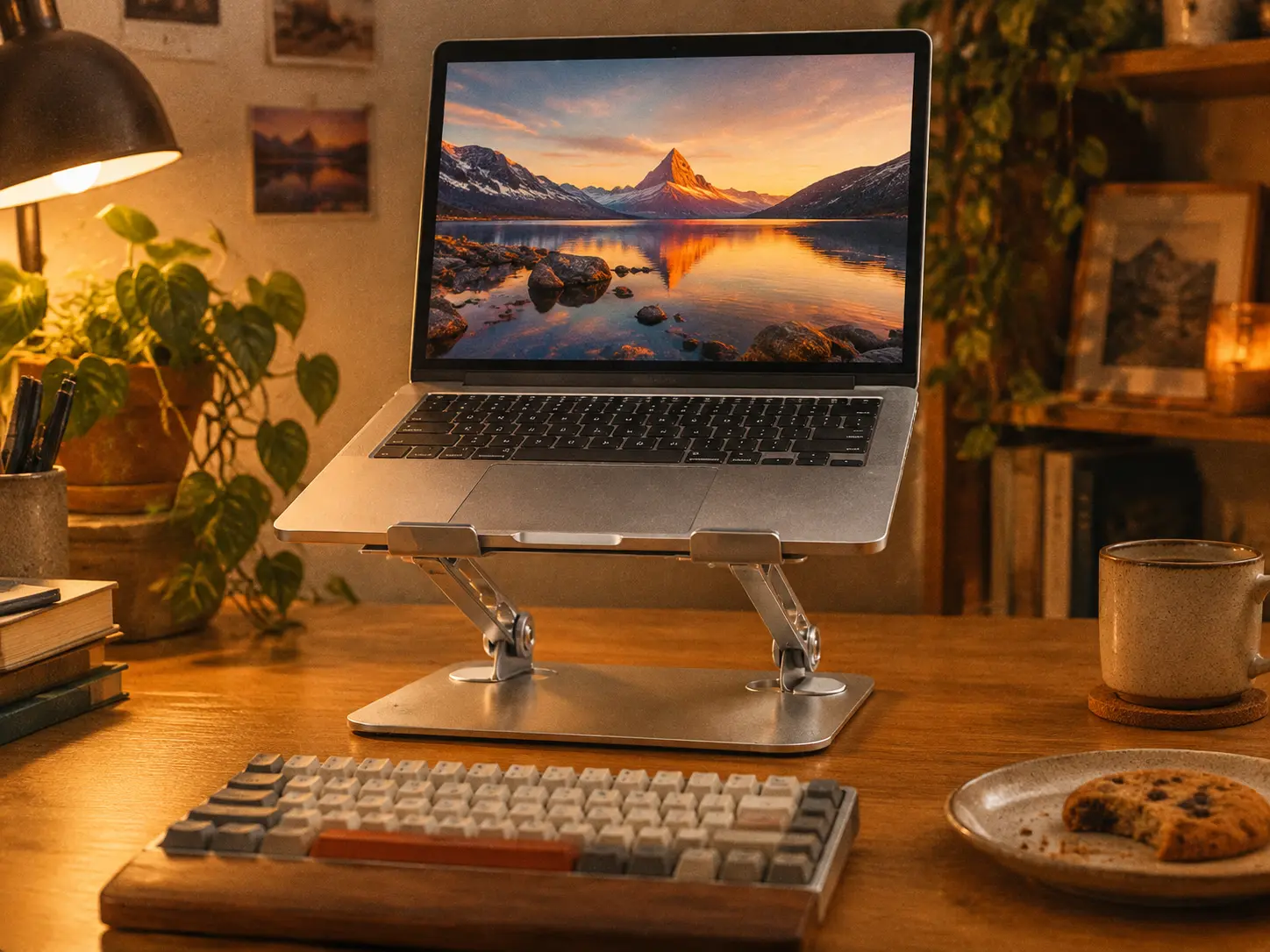
The Z-type aluminum stand is the heavy-duty workhorse of desk setups. Because it features dual hinges, you can raise your laptop screen exactly to your eye level, completely eliminating the “tech neck” slouch. The thick aluminum also acts as a giant heat sink, drawing heat away from your laptop during intense use.
Buyer’s Voice (Amazon/Reddit Consensus)
- Pros: Extremely stiff hinges hold heavy gaming laptops without sagging; perfect height for matching an external monitor; folds completely flat for travel.
- Cons: The hinges are so tight that adjusting it requires two hands and some muscle; typing directly on it will cause the screen to wobble slightly.
2. The Clear Acrylic Riser: Best for Minimalist Aesthetics
Conclusion: If you want your desk to look clean and airy while still elevating your screen, acrylic is the way to go.

Acrylic stands are incredibly popular in the cozy desk setup community because they seemingly disappear. Instead of a bulky metal frame, this clear riser gives the illusion that your laptop is floating. The open space underneath is perfectly sized to slide your keyboard or notebook out of the way when you need to eat or write on your desk.
Buyer’s Voice (Amazon/Reddit Consensus)
- Pros: Looks gorgeous with RGB lighting shining through it; zero assembly required; creates instant storage space underneath for a cleaner desk.
- Cons: It is a fixed height, so you cannot adjust it; acrylic can attract dust and show fingerprints easily if you touch it often.
3. The Vertical Dual-Slot Wood Stand: Best for Small Desks
Conclusion: If you only use an external monitor and want your laptop out of the way, this is the ultimate space-saver.

If you run your laptop in “clamshell mode” (lid closed, connected to a big monitor), leaving it flat on the desk wastes a huge amount of space. This vertical wooden stand holds your laptop upright, instantly freeing up massive real estate on your desk. The dual-slot design means you can dock your laptop in one slot and your iPad or a mechanical keyboard in the other.
Buyer’s Voice (Amazon/Reddit Consensus)
- Pros: The warm wood tone adds a high-end, organic vibe to the room; silicone inserts protect the laptop from scratches; extremely heavy and stable base.
- Cons: Cannot be used if you need your laptop screen open; some older, extremely thick gaming laptops might be a tight fit.
FAQ: Making the Right Choice
1. Do laptop stands actually help with neck pain?
Yes. Looking down puts roughly 50 pounds of pressure on your cervical spine. A stand raises the screen to eye level, allowing you to sit back and keep your spine neutral, which drastically reduces pain and fatigue.
2. Can I type on the laptop keyboard while it is on a stand?
It is not recommended. Typing on a raised stand forces your wrists into an unnatural, upward angle (causing wrist pain) and usually results in screen wobble. Always pair your stand with a separate external keyboard and mouse.
3. Will a vertical stand cause my laptop to overheat?
Usually, no. In fact, standing a laptop vertically exposes the bottom casing to open air, which can actually improve passive cooling compared to laying it flat on a wooden desk. Just ensure the exhaust vents are facing upward.
4. Will aluminum stands scratch my laptop?
High-quality aluminum stands come with rubber or silicone pads on the hooks and the base. As long as you place the laptop gently onto these pads, it will not scratch the aluminum chassis of your MacBook or gaming laptop.